
Turno vs. Properly vs. Breezeway: Which Cleaning and Turnover Tool Actually Earns Its Keep?
Every host I know has a turnover horror story, and I think mine is fairly representative of the genre: a same-day, back-to-back booking at the Philadelphia property, a cleaner who texted “running a little late!” at 2:47pm for a 3pm check-in, and me standing in the driveway explaining to an early-arriving guest, with what I hope was a convincing amount of calm, that the room would be ready “very soon,” while frantically texting my husband, who was two hours north at the Adirondack place elbow-deep in a hot tub repair and could not, physically, come help. Nobody was hurt. Everyone eventually got their room. I aged what felt like six months in about ninety minutes, and I have never once, before or since, trusted a same-day turnover to go smoothly without a backup plan already in my back pocket.
That’s the exact problem this category of tool exists to solve, and it’s why, unlike some of the more speculative categories on this site, this is one where I went in already knowing precisely what I needed a tool to fix. So we looked hard at the three names that keep coming up whenever hosts talk about this: Turno, Properly, and Breezeway.

The honest starting point
Before the table, the same disclosure as the other two articles in this batch: we have not run all three of these side by side on our own properties across a real season yet. We did sign up for free trials of two of them (Turno and Properly, Breezeway requires booking a demo rather than a self-serve trial, more on that below) to look at the actual setup flow, and we made a genuinely useful mistake in the process that I’ll walk through. But this is not yet a full head-to-head field test with our own cleaners and our own calendars across real bookings. We plan to pilot one of these for real this fall, and when we do, this article gets rewritten with our actual data instead of researched specs.
The mistake, and why it matters more than it sounds
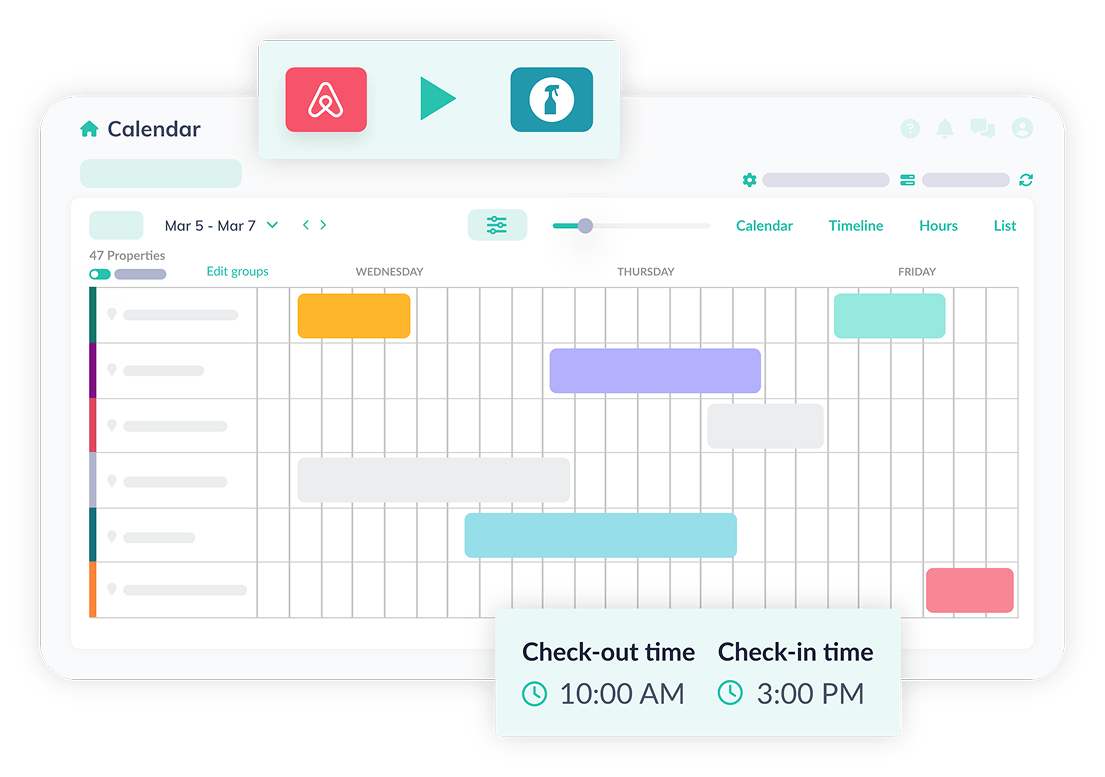
When I signed up for the Turno trial, I connected our Adirondack property’s calendar first, since it’s the one I know best, and I set up what I thought was a straightforward auto-scheduling rule: assign a cleaning task automatically whenever a checkout is detected, with the cleaning window starting at checkout time and needing to finish before the next check-in. Sounds simple. Here’s the mistake: I didn’t account for same-day back-to-back turnovers at all when setting that rule up, the exact scenario from my driveway horror story. I assumed the system would somehow flag those as tight or urgent automatically. It doesn’t, not by default. It scheduled the cleaning task exactly the way I told it to, which on paper looked fine, checkout at 11am, check-in at 3pm, four hours, plenty of time, except it didn’t account for the fact that our actual cleaner needed 45 minutes of drive time between our two Adirondack properties if she was doing both that day, time the tool had no way of knowing about because I never told it.
This is a strong “don’t” and I want to say it plainly: don’t assume any of these tools understand your specific logistics unless you explicitly build that constraint in yourself. These platforms are only as good as what you tell them. A four-hour window that looks perfectly comfortable on a calendar can evaporate into nothing once you factor in drive time, a cleaner covering multiple properties, or supply restocking that takes longer than you’d guess. The software doesn’t know your cleaner’s actual day unless you tell it, and it will happily schedule you into the exact kind of crunch it’s supposed to prevent if you don’t.
How the three actually compare
| Turno | Properly | Breezeway | |
|---|---|---|---|
| Starting price | From roughly $8–10/property/mo, plus a 5% fee on cleans booked through its cleaner marketplace | From about $6/property/mo for unlimited jobs, Pro tier around $10/property/mo | Around $19.99/unit/mo for the core plan; larger portfolios typically need a custom quote |
| Best for | Hosts without their own reliable cleaner who want access to a marketplace of vetted, local cleaning professionals | Small to mid-size hosts who want clear visual checklists and straightforward scheduling without a lot of extra bells | Larger operators, generally 15+ units, who want cleaning bundled with maintenance, inspections, and safety checks |
| Standout feature | A marketplace of 25,000+ vetted cleaners across the U.S., Canada, and Europe | Photo and video-based checklists simple enough for a new cleaner to follow with minimal training | GPS-based staff tracking, plus maintenance and safety inspection workflows well beyond basic cleaning |
| Signup process | Self-serve free trial — we tested this ourselves | Self-serve free trial — we tested this ourselves | Requires booking a sales demo, no self-serve trial as of this writing |
| Watch out for | The 5% marketplace fee adds up fast and is charged on both sides of the booking; doesn’t understand your cleaner’s real-world logistics unless you build that in yourself | Fewer advanced features if you’re managing a larger, more complex, multi-market portfolio | Meaningfully more expensive per unit, and genuinely overkill if all you need is basic scheduling |
What the trial signup actually felt like, tool by tool
Turno’s onboarding was fast, almost suspiciously fast, connect your calendar, set a rule, done in about fifteen minutes. That speed is exactly what led to my logistics mistake above; it’s easy to feel like you’ve “finished setup” when really you’ve just accepted the defaults without stress-testing them against your actual life. Properly’s setup took a little longer specifically because it nudges you to build out a full checklist during onboarding rather than letting you skip straight to scheduling, which felt like friction in the moment but which I suspect is the more responsible design choice, since a checklist you actually built with intention is more useful than one you’ll go back and fix later, which is to say, probably never.
Breezeway, since I couldn’t self-serve trial it, I can only speak to based on their sales materials and what current users report in reviews, which is a meaningfully weaker basis for an opinion and I want to flag that clearly rather than pretend I know more than I do. What I can tell you secondhand is that current users consistently describe it as a genuine operations hub rather than just a cleaning scheduler, useful if cleaning is one piece of a bigger coordination puzzle involving maintenance and inspections, and consistently describe it as overkill if cleaning scheduling is the only problem you’re trying to solve.
Who should pick what, based on what we know so far
If you’re a smaller host, one to five properties, and you already have a cleaner you trust and just want the group-text chaos of scheduling to stop, Properly’s lower starting price and more guided checklist setup looks like the stronger starting point from here. If you don’t have a reliable cleaner yet, or you’re expanding into a new market where you don’t have existing relationships, Turno’s marketplace is the more genuinely useful feature, just budget carefully for that per-clean transaction fee stacked on top of the subscription, it’s easy to undercount how much that adds up to across a full month of turnovers. If you’re managing a larger portfolio where cleaning is only one piece of a bigger operations puzzle involving maintenance schedules and safety checks, Breezeway’s higher price starts to make more sense, because at that point it’s realistically replacing two or three separate tools rather than being an added cost on top of what you already use.
For us, with four properties split across two states, a husband who’s excellent at fixing things but famously does not want to also be the person managing a cleaning calendar, and the specific memory of that driveway still fresh enough to make my stomach drop a little writing this, we’re leaning toward piloting Properly first, purely on price and the more thoughtful checklist onboarding, with Turno’s marketplace kept in our back pocket for the day one of our regular cleaners moves or burns out, which, statistically, eventually happens to everyone in this business.
A second, stronger warning before you commit to any of these
Do not treat any of these tools as a replacement for actually knowing your cleaner’s real capacity. I want to underline this because it’s the single biggest thing I got wrong in my own trial setup, and it’s the kind of mistake that’s invisible right up until the exact moment it isn’t, which is usually a Saturday afternoon with a guest standing in your driveway. Sit down, on paper, before you configure any automated scheduling rule, and map out realistic drive times between your properties if one cleaner covers more than one, realistic time-per-clean based on your actual square footage and not an optimistic guess, and a genuine buffer for the inevitable day when something goes sideways, a delayed checkout, a cleaner who’s sick, a delivery truck blocking the driveway. None of these tools will build that buffer in for you automatically. They will cheerfully schedule you into a crunch if the numbers you give them look fine on paper, exactly the way mine did.
What we still don’t know
We haven’t run a full season of real turnovers through any of these three platforms yet, only the initial setup and trial signup process for two of them, and secondhand research for the third. We don’t yet know how any of them handle the actual chaos of a real, live same-day back-to-back turnover, the exact scenario that got us interested in this category in the first place. That’s the test that actually matters, and it’s the one we’re planning to run this fall. When we do, this becomes a real comparison instead of a researched one.
The conversation I had with our actual cleaner about all of this
Before I got too far into researching these tools, I did something that felt obvious in hindsight but that I almost skipped: I actually sat down with the cleaner who handles our Adirondack properties and asked her, directly, what would make her life easier. I’d half-expected her to say something about pay or scheduling flexibility, and she did mention both, fairly. But the thing she brought up first, unprompted, was that she often doesn’t know what’s actually expected at a given property until she’s already there, because our own instructions have historically lived across three different places: a text thread, a printed checklist taped inside a cabinet that’s sometimes out of date, and whatever she remembers from the last time. That’s not a cleaning problem. That’s a communication problem wearing a cleaning problem’s clothes, and it’s exactly the kind of thing a properly configured checklist tool, whichever one we land on, should fix, assuming we actually build the checklist with her input instead of just guessing at what she needs from our end of things.
That conversation reframed the whole research process for me. I’d gone in thinking about this purely as a scheduling problem, the driveway, the texted “running late,” the frantic two-hour drive that couldn’t happen fast enough. But the deeper issue, the one a tool alone won’t fix if we don’t do the work, is that our actual expectations have never been fully written down in one consistent place. Don’t buy a scheduling tool expecting it to solve a communication problem you haven’t actually diagnosed yet. The tool can host the checklist. It can’t write the checklist for you, and if the underlying instructions are vague or scattered, digitizing a vague, scattered system just gets you a nicer-looking version of the same confusion.
What I’d actually want to know before committing real money
If I’m honest about what’s still missing from my research, here’s the list, in order of what worries me most. First, how these tools actually behave during a genuine emergency, not a planned same-day turnover I’ve scheduled with buffer, but the unplanned kind, a cleaner calling in sick two hours before checkout with no backup lined up. Does the tool help you find a replacement fast, or does it just sit there displaying an increasingly alarming red “overdue” status while you’re already on the phone in a panic doing the actual work of solving the problem yourself? Second, how the mobile app experience actually feels for the cleaner on the other end, not for me, the host, staring at a tidy dashboard, but for someone standing in a driveway with wet hands trying to check off a photo checklist on a cracked phone screen. A tool that’s elegant for the host and clunky for the cleaner is, in a very real sense, a tool that’s solving the wrong side of the problem. And third, what happens across a genuinely difficult month, not a calm one, when three properties all have same-day turnovers within days of each other and the tool has to actually earn its subscription fee instead of just quietly syncing calendars in the background.
None of that shows up clearly in marketing pages or even in most of the reviews I read researching this piece, because reviews tend to get written either right after a smooth first month (recency bias toward the honeymoon phase) or right after a genuine disaster (recency bias toward the worst day). The steady, unglamorous middle, the actual day-to-day experience across a real season, is the thing I trust least from research alone and the thing I’m most looking forward to being able to report on honestly once we’ve lived through it ourselves.
A word about cost creep, because it’s easy to miss
One thing that didn’t fully register for me until I actually built out a rough monthly cost estimate across our four properties is how quickly the “starting at $X per property” pricing can drift once you add transaction fees, per-property multipliers, and the temptation to upgrade to a higher tier the first time you hit a feature wall. Turno’s marketplace fee, for example, is charged as a percentage on both sides of a booking, meaning if you’re using their marketplace regularly rather than your own existing cleaner, that 5% adds up in a way that a simple “$8 a month” headline number doesn’t communicate at all. Across four properties with regular turnovers, that fee alone could plausibly add up to real money over a season, money that doesn’t show up anywhere in the pricing page’s big, friendly number at the top. Don’t evaluate any of these tools by their advertised starting price alone. Build out what a realistic month actually costs across your specific number of properties and your specific turnover frequency before you commit, because the gap between the headline price and the real monthly bill is exactly where budget surprises live.
Why we’re leaning toward starting small
Given everything above, our actual plan, and I want to be transparent that this is a plan and not yet a result, is to pilot just one of these tools on just one property first, most likely the Philadelphia unit where our driveway disaster happened, since it’s the property where the problem is freshest and most acute. We’re deliberately not rolling this out across all four properties simultaneously, even though the marketing for all three tools makes portfolio-wide rollout sound like the obvious move. A single-property pilot lets us find our own version of the mistake I made during the Turno trial signup, the drive-time gap I hadn’t accounted for, on a smaller, lower-stakes scale before we build the same blind spot into a system covering our entire business. If it goes well, we scale up from there. If it doesn’t, we’ve only wasted a month’s subscription on one property instead of four, and a much smaller amount of trust.
Hidden tip
Before you configure automated scheduling in any of these tools, physically time a real cleaning of your own property once, start to finish, including any drive time your cleaner needs between units. Use that real number, not an optimistic guess, when you set up your rules. The gap between “should take about two hours” and “actually takes two hours and forty-five minutes once you count everything” is exactly where turnover disasters live. And before any of that: sit down with the actual person doing your cleaning and ask them what’s currently unclear. The tool is only as good as the instructions you feed it, and the person best positioned to tell you what’s missing from those instructions is the one standing in your driveway doing the work.
Pros (as a category)
All three sync automatically with your booking calendar so you’re not manually tracking checkouts in a spreadsheet or a group text. Photo verification, standard across all three, catches problems before the next guest does instead of after. Pricing is genuinely accessible even for a single host with one or two properties, this isn’t an enterprise-only category.
Cons (as a category)
Meaningful feature overlap makes it easy to overpay for capability you don’t actually need, especially if you’re a smaller host tempted by Breezeway’s more impressive feature list. Marketplace and transaction fees, where they exist, aren’t always obvious upfront and need to be factored into your real monthly cost, not just the advertised subscription price. None of these tools understands your specific logistics, drive times, cleaner capacity, realistic buffer, unless you explicitly build that in yourself, and skipping that step is the single most common and most avoidable mistake a host can make setting one of these up. And, our now-familiar honest caveat: this comparison is built on trial signups and research, not a full season of real turnovers, so treat our recommendation as a strong starting point rather than a final verdict.